


Mobile Wallet
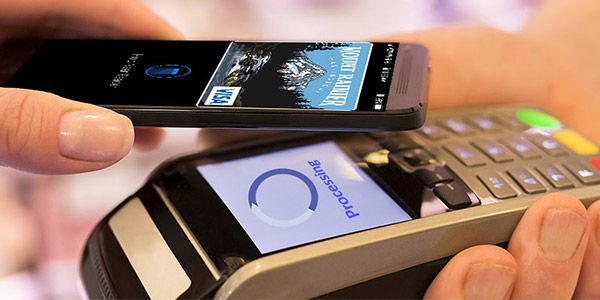
Load your O Bee debit and credit cards into your phone's mobile wallet for security and convenience.
Tired of forgetting where you left your card?
X Missing great deals because you forgot your card at home?
X Not knowing how much you spent on what?
X Feeling overwhelmed with too many cards to keep track of?
It's time to enjoy more freedom
Mobile Wallet is...

Use your mobile wallet when you see this icon at the checkout kiosk.
Convenient
Our cards work with Apple Pay, Google Pay and Samsung Pay. If you forget your cards or cash at home, don’t worry, you can pay with your mobile phone at participating retailers.
You can also use your mobile wallet for purchases within apps and websites too – plus, it’s more secure than using your plastic card.

Just tap or waive to make a payment.
Fast and Easy to Use
Most mobile wallet payments work automatically when your phone is held up to the checkout terminal – just tap or wave it -- no need to open an app.
Pressing your thumb on the phone acts as a digital signature and eliminates the need to use a PIN, expediting the transaction.

Your super-secure payment processes in seconds.
Extra Secure
When you use Mobile Wallet, merchants never receive the information on your card. Instead, they receive a “token”, which acts as a temporary code to process the payment without your actual bank details being exposed.
A hacker who steals a token from a merchant's system will find that it is worthless. It is valid only for a past purchase. A one-use piece of code.
We are an Award-Winning Credit Union
O Bee was voted the Best Credit Union of 2024 in the Pacific Northwest by the Seattle Times, Best Credit Union of 2024 by readers of Showcase Magazine. This is the fourth year in a row O Bee earned the award.
Forbes recognized O Bee as the #1 credit union in Washington State in its 2019 America’s Best-In-State Credit Unions list. This was the second straight year that O Bee made it to the Forbes Best-In-State list. In 2018, Forbes ranked O Bee in the top five.

Start enjoying more freedom today
Load your card into your mobile wallet.
1
Load your card
into mobile wallet.
2
Set as your preferred
method of payment.
3
Simply tap your phone
on the terminal to pay.
Load your Mobile Wallet

Mobile Wallet FAQ
- Simply enroll via your device’s mobile wallet.
- Authenticate yourself by calling the 800 number listed on the directions.
- When on the phone with an O Bee representative, be prepared for this question: “Can you please provide the last transaction that you made with your card?” (The transaction given must be within the last eight acceptable transactions/authorizations.)
- After the transaction is confirmed, the agent will check the phone number you’re calling from. If the phone number matches the mobile number on file, you’ll be authenticated and the token (credit or debit card) will be approved.
- If the phone number does not match, the O Bee representative will move one to the list of six questions specific to you and only you can answer.
Yes, each time you enroll a new card, you will be prompted to call a special 800 number to complete your enrollment.
If your O Bee plastic debit or credit card is lost or stolen, please notify us immediately at 1-800-642-4014. We will cancel your card and issue you a new card. Once you activate your new card, you will need to enroll your new card in the digital wallet again.
O Bee does not charge to use these pay services and there are no fees to add your card to Apple/Google/Samsung Pay. However, your mobile carrier’s message and data rates may apply.
To lock your credit or debit card, first click on the account associated with the card. You will see the Card management tile on your dashboard. Choose the card you want to lock. Click on the green sliding button in the upper right. You will be prompted to confirm that you want to lock your card.
You may unlock it at any time by clicking the sliding button again. You can also use Card Management to report a lost or stolen card.